Firefox Release Notes
Firefox 152.0.3
Fixed
Fixed an issue that could cause extreme memory usage and freezing on startup for users with language packs installed. (Bug 2049845)
Firefox 152.0.2
Fixed
Fixed some Settings section headings showing placeholder text instead of the translated name in certain languages. (Bug 2047983)
Fixed New Tab content not matching the browser's display language after it was changed. (Bug 2046945)
Fixed a regression that could break playback of some MP4 video files. (Bug 2047467)
Fixed a performance regression that could slow down sites performing many encryption and decryption operations at once, such as Proton Drive. (Bug 2046401)
Unresolved
Some users with a language pack installed may experience high memory usage and an unresponsive browser on startup.(Fixed in 152.0.3 in Bug 2049845)
Firefox 152.0.1
Fixed
Fixed frequent crashes affecting users with Intel Raptor Lake processors. (Bug 2039575)
Fixed an issue on macOS where choosing a PDF option, such as "Save as PDF", from the system print dialog would send the job to your printer instead of saving a file. (Bug 2047850)
Firefox 152.0.0
New
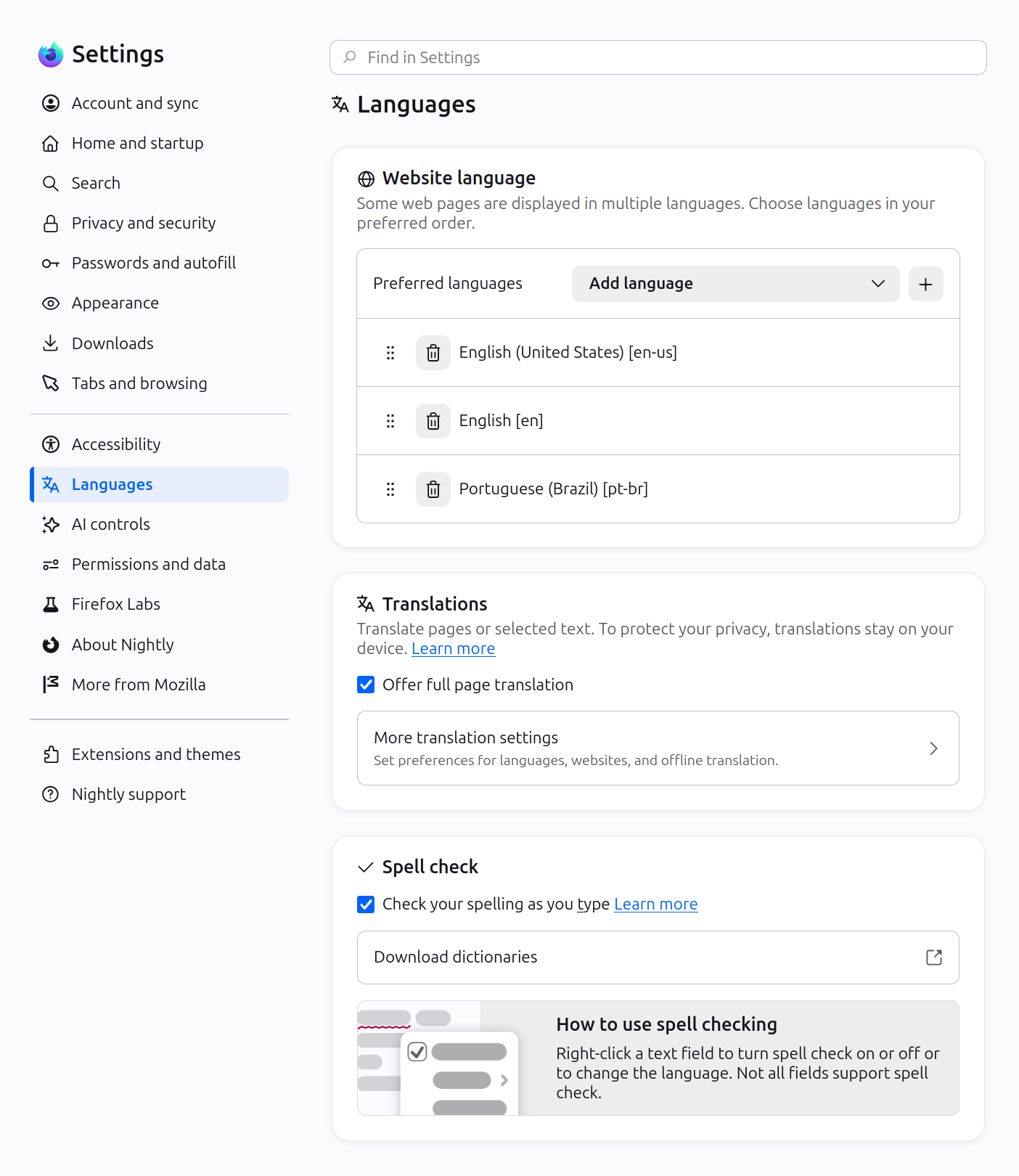
Firefox Settings features a brand-new look with streamlined organization, clearer groupings, and improved navigation for easier customization.
In Private Browsing windows, you can now temporarily disable tracker blocking for a tab if it's causing a site to break. When you reload a page where trackers were blocked, Firefox shows a message offering to reload without the stricter protections. All other tracking protections stay active.

You can now mute your browser from the address bar: type "mute" (or "shush" or "sssh") and use the address bar quick action to silence every tab currently playing sound across all Firefox windows.
Improved support for more advanced cursor movement commands, including those relating to paragraph boundaries, on macOS.
On Windows and Linux, you can now copy links via the tab context menu by right-clicking a tab and selecting Share > Copy Link, making it easy to copy a link without switching to the tab first. When multiple tabs are selected, you can copy all selected links at once. Windows users still retain access to Microsoft sharing options from the Share menu.
A "Send tab" toolbar button is now available which can be added via More Tools > Customize Toolbar.
- Basque
- Galician
Firefox builds in Croatian, English (UK), Georgian, Persian, Slovenian, Tajik, Tamil, Tibetan, Turkish, Welsh, and Xhosa now come with a built-in dictionary for the Firefox spellchecker.
The following languages are now available for Translations:
Firefox Labs
Firefox now offers experimental support for the new JPEG XL image format, which generally provides better compression than WebP, JPEG, PNG, and GIF and is designed to supersede them. You can enable it from the Firefox Labs panel in Settings.

Fixed
Fixed an issue where the Paste option could be missing from context menus when editing content on sites such as Squarespace, LinkedIn, and eBay.
Improved dragging images from Firefox to the desktop or Finder on macOS — images now save reliably and land where you drop them.
In multiple monitor situations, the About Firefox window now more reliably opens on the display with the most recently used Firefox window.
Fixed arrow-key text navigation and word selection commands that moved in the wrong direction in right-to-left text on macOS and Linux.
Various security fixes.
Changed
Site zooming via keyboard or mouse now offers more zoom levels in smaller increments than before.
When a PDF or other file that Firefox opens directly finishes downloading, it now opens in a background tab if you've switched tabs or closed the original page.
The Tabs from Other Devices panel in the sidebar now lets you open tabs in a new tab or a new container tab from the context menu.
Developer
- Developer Information
Developer Tools now have an option in the Settings panel to toggle the display of comment nodes in the Inspector.
Web Platform
Web Notifications can now have action buttons via the
actionsoption. They appear as buttons below the notification text or in the Options list on macOS.The
field-sizingproperty is now available, allowing form controls to adjust in size to fit their contents.Firefox now supports the WebAuthn Related Origin Request feature, which simplifies login flows by making Passkeys usable from multiple domains.
The Pointer Lock API now supports the
unadjustedMovementoption, allowing sites to receive raw mouse-movement data unaffected by OS-level acceleration.
Community Contributions
- :23rd: 1812100
- :Vincent: 2033780
- Akeem Omosanya: 2031351, 2035252
- Amin Amir: 2031353, 2031355, 2031599, 2033820
- Amine Zroual: 1392125
- Andrew Gaul: 2032275
- Andy [:rgbcmy]: 1611643
- Eugeniusz Lewandowski: 1650944, 2036580
- Helmut Januschka: 2006340
- Jak: 2030070
- JIANG Zhirui: 2036199
- liz: 1875083, 2008119, 2011485
- Mubashshir: 1803078
- Noah Peterson: 1829401
- Rahman Mahmutović [:r_m]: 1717176
- Sahaj: 2031015
- Takeru Mitsumori: 2038948
- Tim Elliott: 2031507
- tom.passarelli: 2031328
- Tymur Boiko: 2035749, 2036839, 2039309
- Vignesh B [:vsr-b]: 1895393, 1966844
- vinitjangir: 790194, 2000360
- vyofgod: 2031349, 2031356, 2031357, 2031371, 2031377, 2031381
With the release of Firefox 152, we are pleased to welcome the developers who contributed their first code change to Firefox in this release, 25 of whom were brand new volunteers! Please join us in thanking each of these diligent and enthusiastic individuals, and take a look at their contributions:
Firefox 151.0.4
Fixed
Fixed an issue on Windows where Firefox could become unresponsive when using the back and forward buttons. (Bug 2039866)
Fixed an issue where Firefox could fall back to software rendering on some older GPUs, reducing graphics performance. (Bug 2043249)
Fixed a crash on Windows that could occur when Firefox interacted with accessibility services. (Bug 204330)
Fixed an issue where some text input fields could incorrectly show a resize handle. (Bug 2044051)
Firefox 151.0.3
Fixed
Fixed an issue where selecting or pasting text in a text field inside a table cell could disrupt the page layout. (Bug 2041235)
Fixed an issue where the VPN toolbar button icon could appear larger than intended. (Bug 2042454)
Various security fixes.
Firefox 151.0.2
Fixed
Fixed an issue on macOS where smart cards and security keys could fail to load certificates automatically. (Bug 2041208)
Fixed an issue where adding another tab to an existing Split View could unexpectedly close it. (Bug 2039795)
Fixed an issue where Split View would close instead of switching tabs when using the "Switch to Tab" option from the address bar. (Bug 2039787)
Fixed a crash on Windows that occurred when using the Sogou input method to type Simplified Chinese. (Bug 2039203)
Fixed an issue where Firefox stopped caching new content once the disk cache was full, causing pages and resources to be re-downloaded from the network on every visit. (Bug 2031577)
Fixed an issue where some websites could render incorrectly or fail to load when they used JavaScript to insert WebKit-specific style rules. (Bug 2040693)
Fixed an issue where clicking and selecting text in some input fields and text areas did not work on pages that styled them with certain CSS rules. (Bug 2039504)
Fixed an issue where the up and down buttons on number input fields could overlap and hide the value when sites sized the field to fit its contents. (Bug 2039315)
Fixed an issue where sorting strings that include numbers could produce an incorrect order on some websites and web applications. (Bug 2027078)
Fixed an issue where dropdown menus would not open for
<select>elements created inside an iframe and then moved into the parent page. (Bug 2041720)
Firefox 151.0.1
Fixed
Fixed a crash experienced by users with Intel Raptor Lake CPUs. (Bug 1950764)
Fixed an issue on Windows where some websites using WebSerial to flash device firmware could fail unexpectedly. (Bug 2040754)
Firefox 151.0.0
New
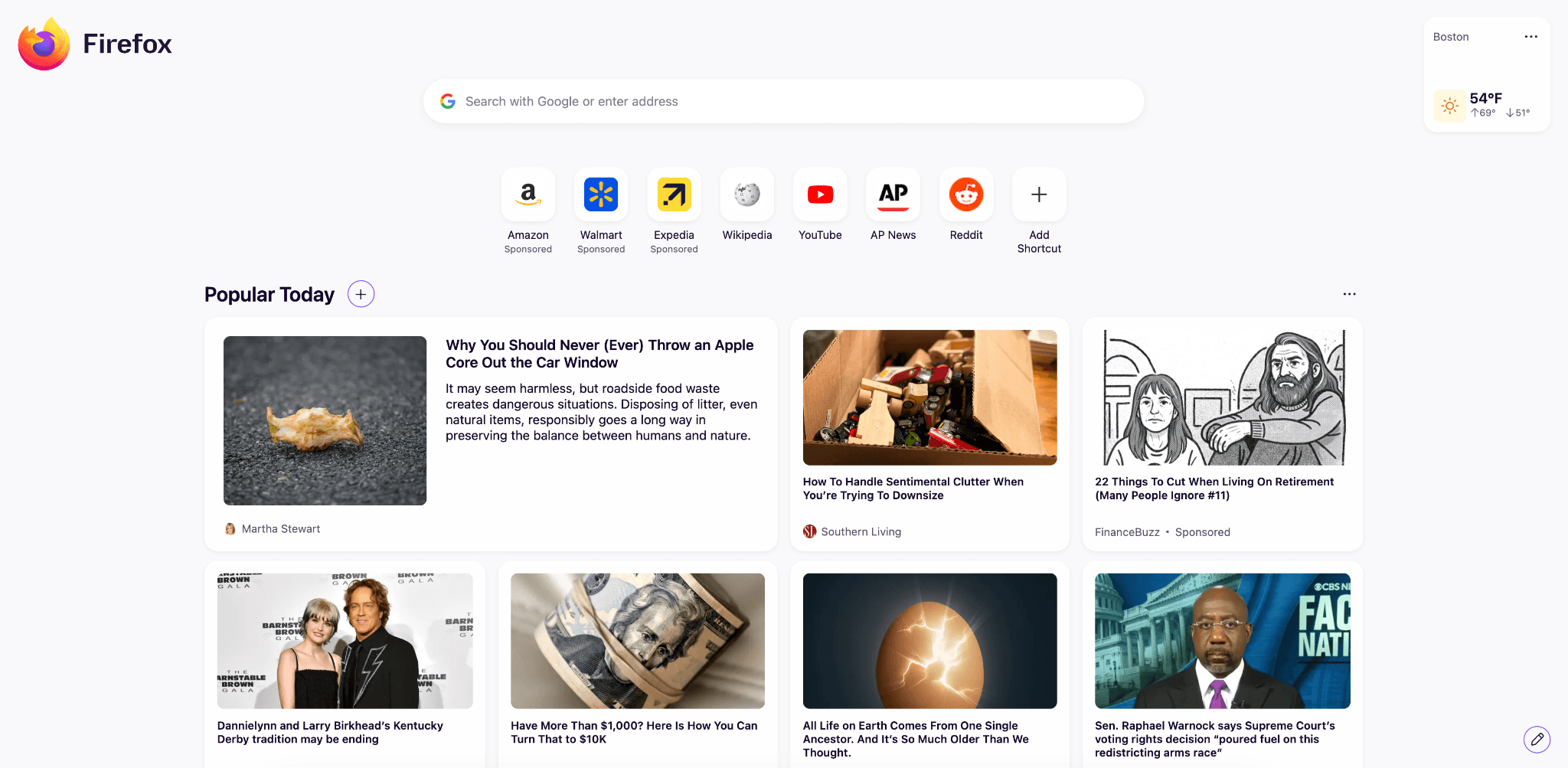
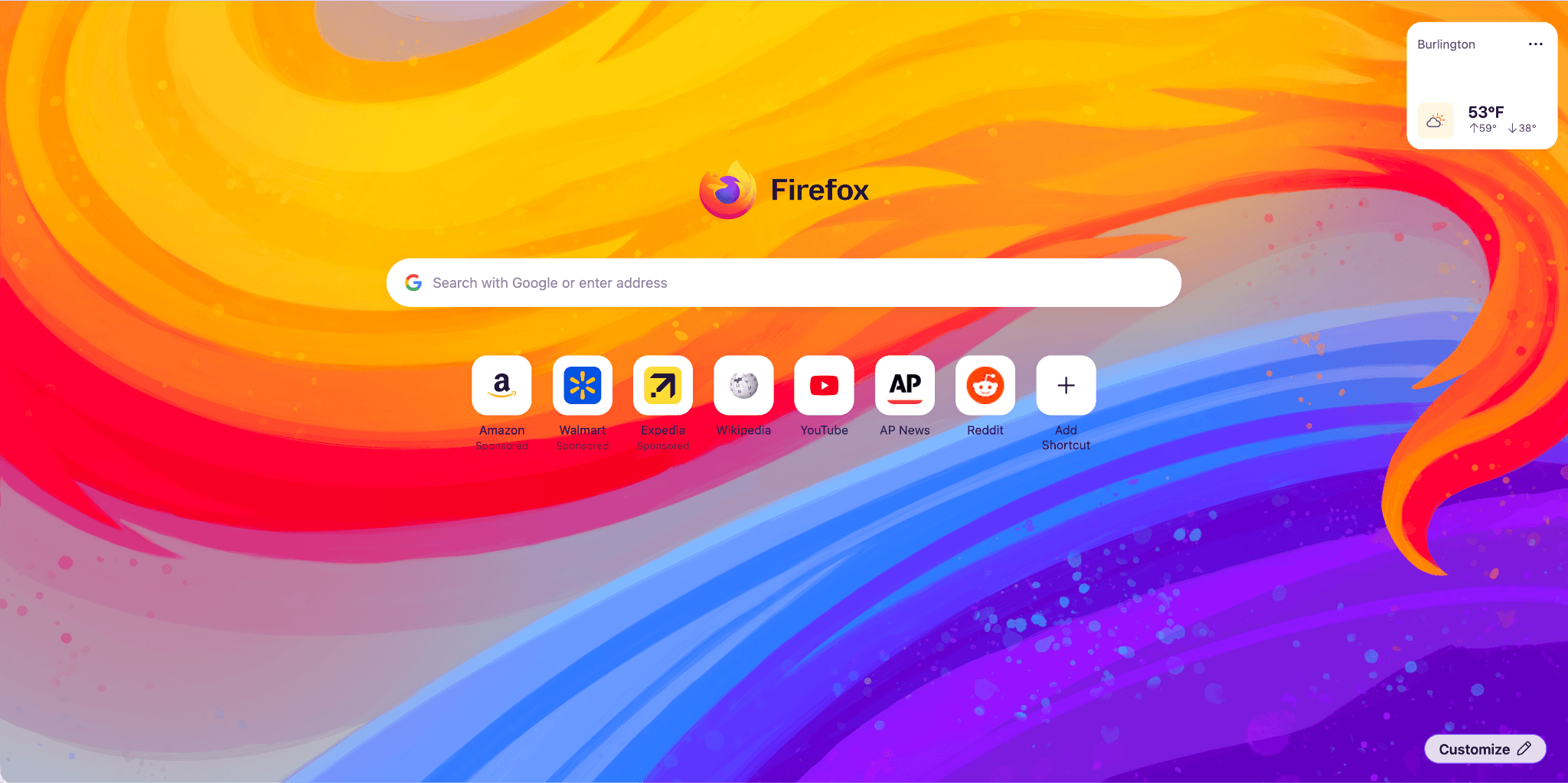
Firefox Home (New Tab) has a fresh, new look and feel. The layout and design will enable upcoming features, from widgets to shortcuts improvements, launching between 151 and 152. Included are some new and exciting Wallpapers, such as the one below. Use the pencil icon in the lower right to check them out.
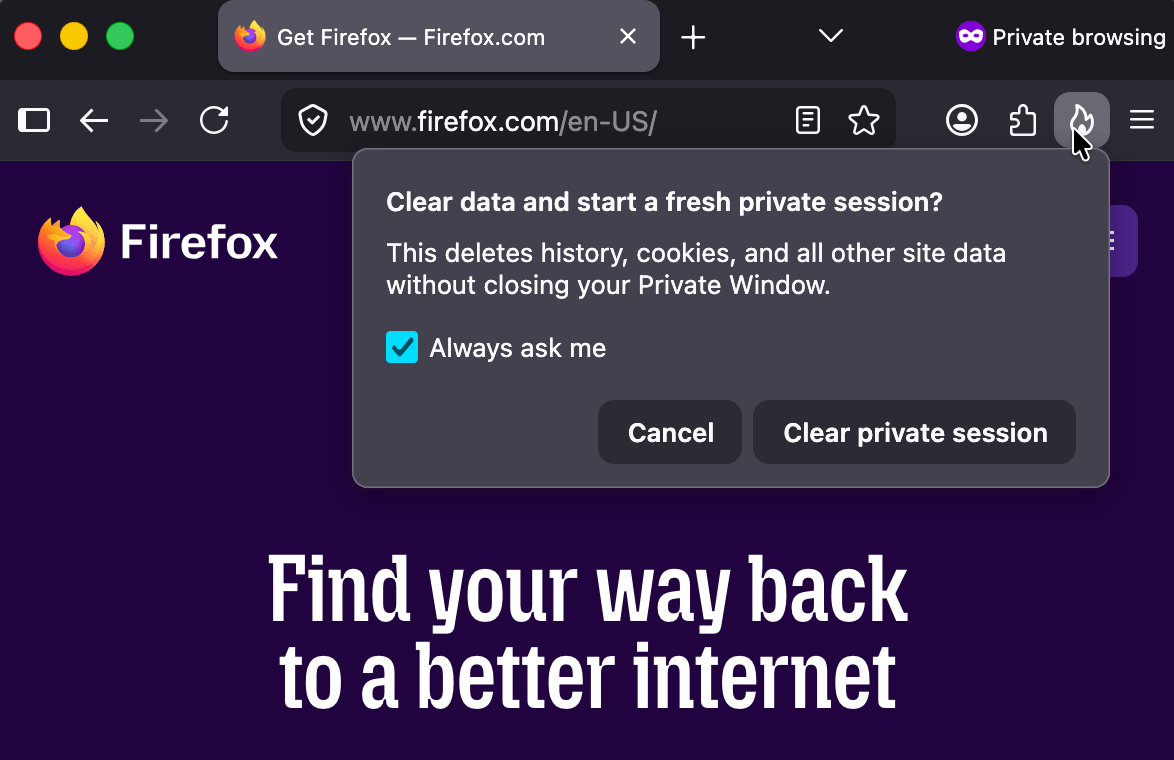
Private Browsing Mode now allows you to instantly clear all data from your current session without closing the entire window. When you select the End Private Session button (the fire icon) to the right of the URL bar, Firefox will ask you to confirm to clear your session. Once confirmed, it will wipe all of your private browsing data and open a fresh new Private Browsing Mode session for you.
Firefox now strengthens protection against fingerprinting in Standard Enhanced Tracking Protection, making it harder for websites to track you across sites by limiting the amount of information revealed about your device and browser. This reduces the number of users uniquely identifiable by common fingerprinting techniques by an average of ~14%, and by ~49% on macOS.
You can now merge multiple PDFs directly in Firefox PDF. Combine separate PDF files into a single document without ever leaving Firefox or relying on third-party tools.
The Translations page (about:translations) is now accessible through the More Tools section of the Application Menu.
Local Firefox profile backups are now available on Linux in addition to Windows, and you can restore them across platforms.
On macOS, URLs copied from iOS devices using Apple’s Universal Clipboard now paste correctly in Firefox.
On macOS, dropdown menus on web pages now use the native macOS menu style, matching the look and behavior of the rest of the system.
Address Autofill is enabled for users in the Netherlands.
Firefox’s built-in VPN now lets you choose your browsing location, giving you more control over how and where your traffic appears online. You can select from available countries or use Recommended to automatically choose the best connection for your network.
Fixed
Fixed incorrect screen resolution reporting to websites in multi-monitor setups.
Fixed an issue on macOS where maximized Firefox windows could reopen on the wrong monitor after relaunching in multi-monitor setups.
Improved color management for copied and pasted images on macOS.
Various security fixes.
Changed
The search bar in Firefox Settings (about:preferences) is now larger and spans the full width of the settings content area, making it easier to find options.
Extensions and Themes installed in a Firefox Desktop profile directory will be restored successfully after the profile directory is moved or restored to a different location or a different operating system.
Geolocation on Windows now respects the user's Windows location permission setting, instead of overriding it, when the user grants location permission to a page. Firefox will ask users to enable the Windows permission if it is needed.
Enterprise
You can find information about policy updates and enterprise-specific bug fixes in the Firefox for Enterprise 151 Release Notes.
Developer
Web Platform
You can now manage microcontrollers that support serial communications in Firefox via the Web Serial API. This lets you program microcontrollers and development boards, such as ESP devices, Raspberry Pi Picos, 3D printers, CNC machines, and other devices. Web Serial can be used in Extensions, but not from moz-extension contexts at this time.
Local network access restrictions are now rolling out to all users. Firefox requires websites to request permission before connecting to devices on your local network or to apps and services on your device. Previously, this protection was limited to users with Enhanced Tracking Protection set to Strict.
The new Fullscreen Keyboard Lock API adds an optional argument to
requestFullscreenthat allows websites to request that while fullscreen, pressing the Escape key will no longer exit fullscreen (instead, a long-press is required), and certain formerly-reserved browser hotkeys are allowed to be default-prevented.Firefox improves the rendering of absolutely positioned elements across multi-column containers and when printing, producing more accurate positioning and fragmentation.
@container rules now allow specifying a list of container query conditions rather than a single condition.
Firefox now supports container style queries, allowing styles to be applied to an element based on the computed values of its container's custom properties. This can be done by using one or more
style()functions inside @container rules.A new
CSSContainerRule.conditionsproperty was introduced, holding an array of all container query conditions. This new property is intended to replaceCSSContainerRule.containerNameandCSSContainerRule.containerQuery, which only supported a single name and query, making them deprecated.Updated the behavior of implicit anchors in CSS Anchor Positioning. The position-anchor property now defaults to
normal. When using position-area, implicit anchors are applied automatically, while popovers usinganchor()oranchor-centernow requireposition-anchor: autoto opt in.Firefox now supports the Document Picture-in-Picture API, which allows web pages to place content in an always-on-top popup.
Temporary site permissions are now correctly reflected in the Permissions API.
Firefox now supports the declarative definition of slot assignment behavior for shadow roots.
Community Contributions
- Allison Embrey: 1938268
- any1here: 2031162
- aoia7rz7l: 1978290, 1984679
- Armin Ulrich: 2031598
- Brandon Lucier: 2030631
- Chidimma Okoloigwe: 1901274
- Chukwuka Rosemary: 1846829, 1948019, 2026574, 2028153
- david.nicolson: 2026024
- DrSeed: 1962904, 1968244, 1982888
- EJiro Oghenekome: 1910902, 1938466, 1952061
- gotyaoi: 1807516
- Hailia: 2016934
- Itoro James: 1936929, 2015491
- japandi: 1977741, 1986020, 2015071
- John Iweh: 1997925, 2027867
- jonathancabera: 2012399, 2016058, 2026032
- Keji Bakare: 2006572, 2008756, 2025287, 2031116
- Kevin Doughty: 1984925
- kofoworola shonuyi: 1999012, 2019901, 2028293
- konyhéa: 1856191, 1876108, 1883497, 1891970, 2014334, 2030069
- Mary cathline: 2022115
- Miha Lepej [:lepko]: 2026335, 2029254
- mozilla.7fhrv: 2023374
- Noble Chinonso: 1945835, 1953621, 2019235, 2025701, 2028628
- Okhuomon Ajayi: 2018272, 2026649, 2029684
- Oluwatobi: 1975391, 2019936, 2023913
- Osoble: 1876109
- Philipp Hancke [:fippo]: 1056433, 2028060
- Pranjali Srivastava: 944228, 1874155, 2009917
- Rishan: 2030428
- ROSHAAN: 1997346, 2018276, 2028927
- Sameeksha: 2008178, 2021421
- Sayd Mateen: 2021681
- SuGotLand: 2025558
- tk: 1826983
- Vector: 2008128
- wenzhao: 2031373
With the release of Firefox 151, we are pleased to welcome the developers who contributed their first code change to Firefox in this release, 37 of whom were brand new volunteers. Please join us in thanking each of these diligent and enthusiastic individuals, and take a look at their contributions:
Firefox 150.0.0
New
Split View just got better: You can now right-click any link and choose Open Link in Split View to open it alongside your current tab. You can also search open tabs when creating a split view and quickly reverse tab positions using the new Reverse Tabs option in the tab context menu.
Share multiple tabs in a single step. Select several tabs, right-click, and choose Copy X Links (for Windows and Linux) or choose Share → Copy X Links (for MacOS). When pasted into other apps that support rich text, links include both the page title and the URL for easy reading.
You can now use Firefox’s built-in PDF editor to reorder, copy, paste, delete, and export pages in a PDF.
Try out real-time, private translations in Firefox Desktop with the
about:translationspage. Start typing the word "translate" into the URL bar for a quick-action shortcut to the page.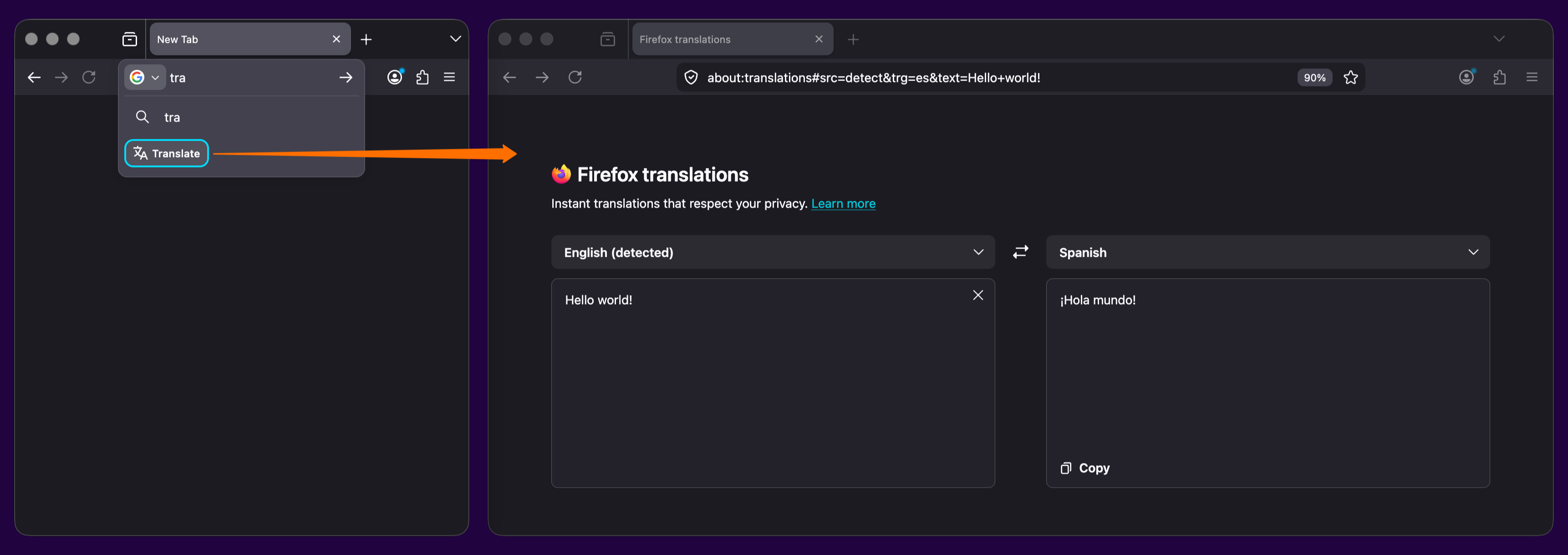
Added support for the GTK emoji picker on Linux, allowing users to insert emoji using the system shortcut (typically
Ctrl+.).Firefox web apps are now available to Windows users who installed Firefox through the Microsoft Store.
The new Firefox Profile management system is now available to all users, including users on Windows 10.
Backing up a profile to a file is now available to all Windows 10 and 11 users, including those who use the new profile management system.
Firefox now ships with a new .rpm package for Linux users on Red Hat, Fedora, openSUSE, and other RPM-based distributions.
Firefox now prompts you to enable location access in Windows settings when granting a website permission to use your location, if geolocation hasn't already been allowed. This behavior, previously limited to some Windows 11 versions, now applies to all supported Windows versions.
The built-in VPN is now available for users in Canada. Note: This feature is not available in enterprise environments.
Currently available in: Canada, France, Germany, United Kingdom, United States
Fixed
Fixed an issue on macOS where, when macOS Lockdown mode is enabled, emoji characters are not displayed in web content.
Various security fixes.
Changed
If you prefer creating tab groups from the context menu, you can now turn off drag-and-drop group creation in Settings > Tabs > Drag tabs to create tab groups.
Enterprise
You can find information about policy updates and enterprise-specific bug fixes in the Firefox for Enterprise 150 Release Notes.
Developer
- Developer Information
A new element-specific section has been added to the pseudo-class toggle panel including a toggle for the
:openpseudo-class, which is only available for elements that have an open state like<dialog>elements. The existing toggle for the:visitedpseudo-class was also moved there, as it only applies to<a>and<area>elements. (Learn More)The
Document.caretPositionFromPoint()method now only returns a position in a shadow DOM if its ShadowRoot is passed in the newly-added shadowRoots option.The devtools network monitor now indicates when a connection used a certificate issued by a certificate authority not in Mozilla's Root CA Program.
Web Platform
Firefox now supports the ariaNotify API for accessibility notifications (e.g. for screen readers) as a more ergonomic and reliable alternative to ARIA live regions.
Firefox now supports media element pseudo-classes (e.g.,
:playing,:paused) to allow more precise styling based on media playback state.Added support for the highlightsFromPoint() API, which allows web pages to interact with CSS Highlights by returning all Highlights at a given point.
Firefox now supports light-dark() on images, just like on colors, which is very useful for supporting dark mode on websites.
The color-mix() function previously accepted only two color values. This limitation has now been removed, allowing the function to accept an arbitrary number of colors.
Added support for a new
autovalue on the sizes attribute for lazy-loaded image elements with multiple images defined viasrcset. This allows the browser to automatically select the right image based on the layout width of the image element. (Learn More)
Unresolved
Users with Bitdefender security software installed may experience problems loading websites, particularly Facebook.com. We are working on a workaround, but as a temporary mitigation, disabling Bitdefender or turning off its traffic filtering features may resolve the issue.(Fixed in 150.0.1)Some websites on internal or corporate networks that require a login prompt may fail to display the sign-in dialog in Firefox 150, showing a blank page instead.(Fixed in 150.0.2 in Bug 2034752)
Community Contributions
- Akeldama: 1718781
- Alex Reisner: 2005628
- amar.p.t.1397: 2003168
- Anshul Malik: 1561441, 1814459, 2018447, 2018843, 2019010
- baris: 2008127
- Ben: 1967026
- Chad Gratts: 2003111
- Elliott Ashby: 1674654
- geppy: 1767617
- Giedrius Visokinskas [:gvisokinskas]: 1910291
- Jocsan: 2016933
- Justin Peter: 1971538, 2010486, 2018840, 2018842
- karan68: 1998004
- Knot False: 1861645
- Liam Wachter: 2018739
- Michael Lynch: 2023046
- Mohammed Abdullah: 1942439
- Nathan Johnson [:narjoDev]: 1895394
- Pushkar Singh: 2003191
- Sally Frye: 2003170
- Thien Pham: 2001134
- tushar sariya: 928224, 1939501, 1975962
With the release of Firefox 150, we are pleased to welcome the developers who contributed their first code change to Firefox in this release, 22 of whom were brand new volunteers! Please join us in thanking each of these diligent and enthusiastic individuals, and take a look at their contributions: